Changing anything
Patches
Patches change anything of the game's: a sword's damage, a bread slice's price, what brigands carry, what the innkeeper sells, where a lantern stands. Each is an entry naming something by its address and saying what to set on it. Format 4.
"patches": [
  { "patch": "thing/Longsword", "set": { "WeaponDamage.damage": 27 } },
  { "add": "item/mymod.HardBread", "from": "item/BreadSlice", "set": { "itemName": "Hard bread", "price": 1 } },
  { "patch": "asset/NpcKit/brigand", "set": { "weapons+": [ "Billhook" ], "offHandChance": 0.5 } },
  { "remove": "rp/merchants/Innkeeper", "path": "sells[BreadSlice]" },
  { "place": "thing/Lantern", "scene": "MainGame", "at": [19.2, 11.2], "id": "lantern_by_the_chest" },
  "patches/more.json"
]
A string in the list is a file of the mod holding a list of entries (or { "patches": [ ... ] }). The example mod Examples/patches uses every kind of address at least once.
Entries
| entry | does |
|---|---|
{ "patch": "<address>", "set": { ... } } | changes one thing there is |
{ "add": "<address>", "from": "<address>", "set": { ... } } | makes a new one as a copy of from. A quest, a dialogue and an RP row can be made from nothing; a thing and an item are always copies, named thing/<mod id>.<Name>, item/<mod id>.<Name> |
{ "remove": "<address>" } | takes an RP row or a map object away. With "path": "list[2]" (or "paths": [...]) it takes a list's element out of anything instead; on a thing or a map object, "path": "Wheel" takes a child object away |
{ "place": "<thing>", "scene": "MainGame", "at": [x, y], "id": "..." } | puts a thing (or an item, with "count") in a scene every time it loads. "facing" turns it, in degrees. "set" changes the one placed: it becomes a thing of its own, thing/<mod id>.<id>, so every machine online makes the same |
{ "build": "maps/x.map.json", "scene": "MainGame" } | builds a map file into one of our scenes each time it loads (The map editor) |
"note" is a comment, for you. Anything else an entry doesn't know is told.
An entry is done whole or not at all: one wrong key leaves the rest of that entry undone. Later mods win over earlier ones on the same value.
Addresses
| address | names |
|---|---|
thing/Longsword | anything of the content catalog: weapons, armour, clothes, props, animals, carts. The ModKit's addresses.json lists them |
item/BreadSlice | an item: one of the catalog's, or an RP item (changed once the RP items are made) |
quest/h01 | a quest |
dialogue/Mill_Intro | a dialogue by its name |
asset/NpcKit/brigand | one of the game's settings assets by its kind and name: NpcKit, NpcTuning, DropTable, MusicSet, MusicCue, Sides, FactionNerve, HeraldryCatalog, CritterSounds, GoreSheet, Heavy, VillageLayout, BattleRoster, GenKit, LandKit and more |
rp/items/Bread | a row of an RP data file by its "id". rp/items/gear/Saw names the list where two lists share an id; rp/stations/types a section of the file; rp/stations/Forge a key inside one; rp/economy the whole file |
map/MainGame/<id> | an object of a scene: by its map id, a placed one's <mod id>.<id>, a save key (#key), or where it sits (Village/Mill~1/Door, ~1 the second of that name). A path after it reaches its children |
res/Kits/brigand | in values only: one of the game's by its Resources path |
On the bench every address is picked, never typed: the picker searches all of them.
Paths in set
On a thing or a map object:
"Component.field","Component.field.sub","Component.list[2].x""Child/Path:Component.field": a child object's component"Component#1.field": the second of that kind"active","Child/Path:active": whether it is there at all
Components go by their short name (WeaponDamage, SpriteRenderer), or by a kind they are made from (a longsword's SlashingWeapon is a ProceduralWeapon; any collider is a Collider2D). A namespace is needed only when two share a name (Firearms.ShotLook). Unity's own components take the names the Unity manual uses: SpriteRenderer.color, Transform.localScale, BoxCollider2D.size.
A component is looked for on the object and then below it, child by child: "WeaponDamage.damage" finds the longsword's hitbox on its child. Of several, the nearest wins; #1 takes the next in that order.
On an item, a quest, a dialogue or an asset: "field", "field.sub", "list[2].x".
On an RP row: its keys, with dots for what is inside ("effects[0].value"). A key that isn't there is made.
Lists:
[2]is a place, 0 the first and-1the last;[mill]is the element whoseidornameismill. In a list of words or numbers,[Moustache]is the one equal to it:"beards[Moustache]"."list": [...]replaces a list whole,"list+": [...]adds to its end,"list-": [...]takes out the matching ones (equal values, or objects with the sameidorname).
A path goes on through a link to another part of the same thing: ProceduralWeapon.weaponSprite.sprite is the picture of the weapon's own SpriteRenderer. A link to anything else is changed by its own address.
Values
- Numbers,
trueandfalse, words, choices by name ("Thrust"; several flags as"Rivets, Rust"). - Colours
"#rrggbb"or"#rrggbbaa"; positions[x, y]or[x, y, z]; a turn in degrees. - An object written over an object of the game's sets only the keys given.
- Pictures:
"art/x.png"for a Sprite or Texture2D. A sprite keeps the pixels per unit and pivot of the one it replaces unless{ "picture": "art/x.png", "ppu": 24, "pivot": [x, y] }says otherwise (the pivot a pixel from the top left). - Sounds:
"sfx/x.wav",.ogg,.mp3, or a list of them for a field holding several. Texts:"dialogue/x.txt"for a TextAsset. - Links:
"thing/Longsword"(the thing, or the field's component on it),"item/Bread","quest/h01","dialogue/...","asset/NpcKit/brigand","res/<Resources path>".nullclears a link.
A value a field can't hold, a name that isn't there, a list that is shorter: each is told on the Mods page with its file and entry, with "did you mean" for near names:
patches/items.json #2: "itemNam": ItemData BreadSlice has no "itemNam" - did you mean "itemName"?Dialogues
{ "add": "dialogue/mymod_Greeting", "file": "dialogue/greeting.txt", "translations": { "sk": "dialogue/greeting.sk.txt" } }Written as ours are, and compiled as the mod loads; what doesn't compile is told by line. "file" and "translations" also replace the text of one of ours on a patch. "set": { "references": ["quest/..."] } lets its <<quest start ...>> find a quest first.
Examples
A sword a little harder:
{ "patch": "thing/Longsword", "set": { "WeaponDamage.damage": 27 } }Brigands that carry billhooks too and never a moustache, from the example mod:
{ "patch": "asset/NpcKit/brigand", "set": { "weapons+": [ "Billhook" ], "offHandChance": 0.5 } },
{ "remove": "asset/NpcKit/brigand", "path": "beards[Moustache]" }
Cattle that drop bones:
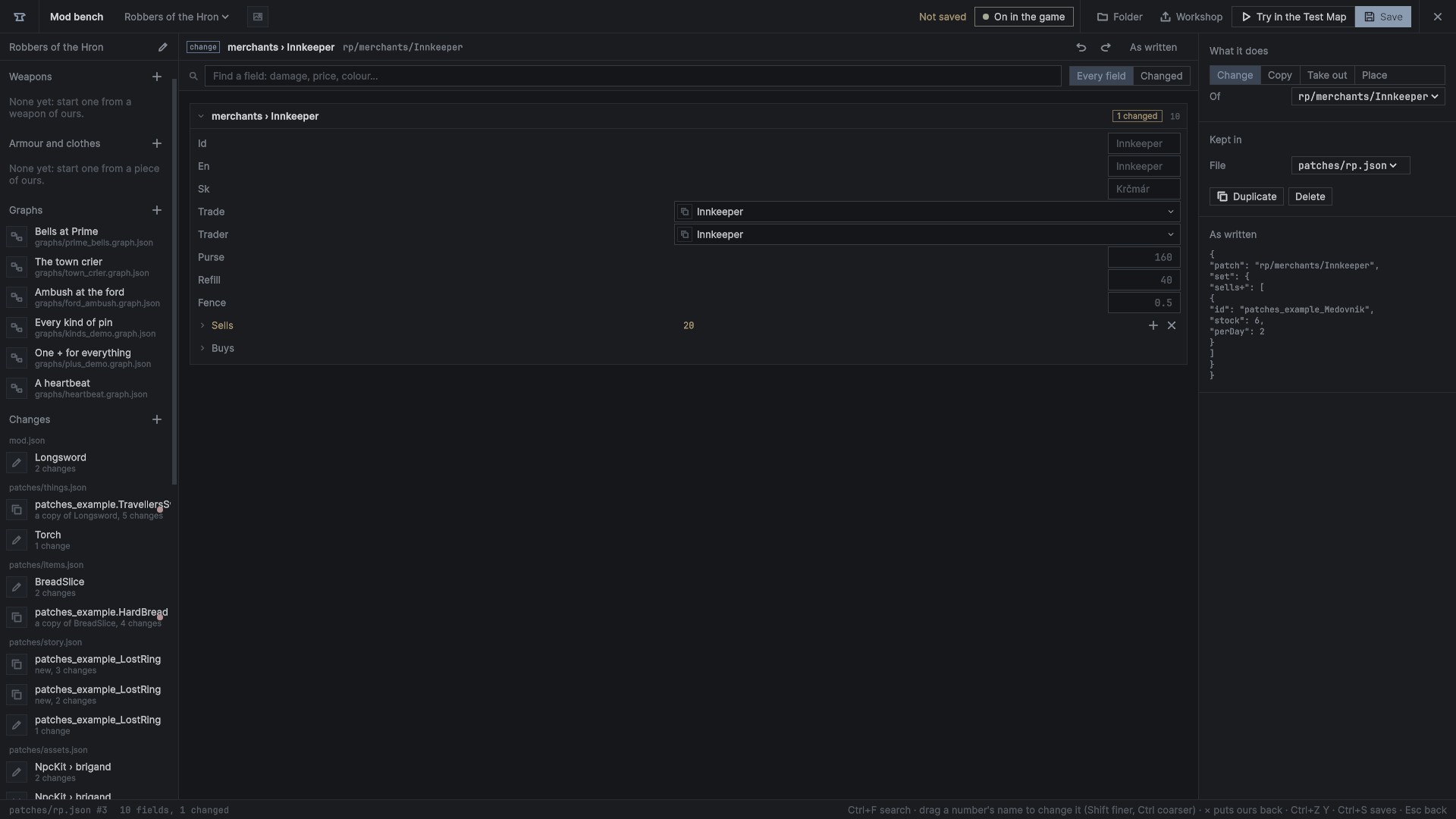
{ "patch": "asset/DropTable/Cattle", "set": { "drops[0].chance": 0.9, "drops+": [ { "id": "BreadSlice", "count": [1, 2], "chance": 0.5 } ] } }The innkeeper selling the example's honey cake (an RP item it adds) and no longer small beer:
{ "patch": "rp/merchants/Innkeeper", "set": { "sells+": [ { "id": "patches_example_Medovnik", "stock": 6, "perDay": 2 } ] } },
{ "remove": "rp/merchants/Innkeeper", "path": "sells[BreadSlice]" }
A lantern placed by a chest in Šášov's village, every time the scene loads:
{ "place": "thing/Lantern", "scene": "MainGame", "at": [19.2, 11.2], "id": "lantern_by_the_chest" }What stays as it was
Nothing a mod does is written into the game's files. Ours changed in memory are put back when the mods are made again, and when play stops in the Unity editor.
- A thing is changed where the game keeps it, so every one made after (from the catalog, a spawner, a rack) comes changed. Ours standing in a scene are changed as the scene loads; weapons and armour as they wake.
- Things placed are made where the game is decided, never on a client, and reach clients as any spawned thing. Offline, a save keeps what became of a placed thing, never the thing itself, so nothing doubles on loading.
- RP rows: switching mods in the menu has everything that read the RP files read them again with the new rows. During a game they are in use: new rows are refused with that reason, and come in when the mods are next made again from the menu.
- Patches never reach the mod system, the network, saving or reports, nor the content catalog, the network's prefab table, the recorder's catalog or achievements.
On the bench
The Changes group of the mod's list holds its patches, by file. Each says what it is about and what it does ("3 changes", "a copy of items › Bread", "taken out", "placed in MainGame"), with a red dot when the game told a problem about it.
- + opens the address picker: everything a patch can name, searched, folded by kind while browsing.
- Pick what to do with it: change it, add a copy (an RP row like it), place it in a scene (things), or take it out.
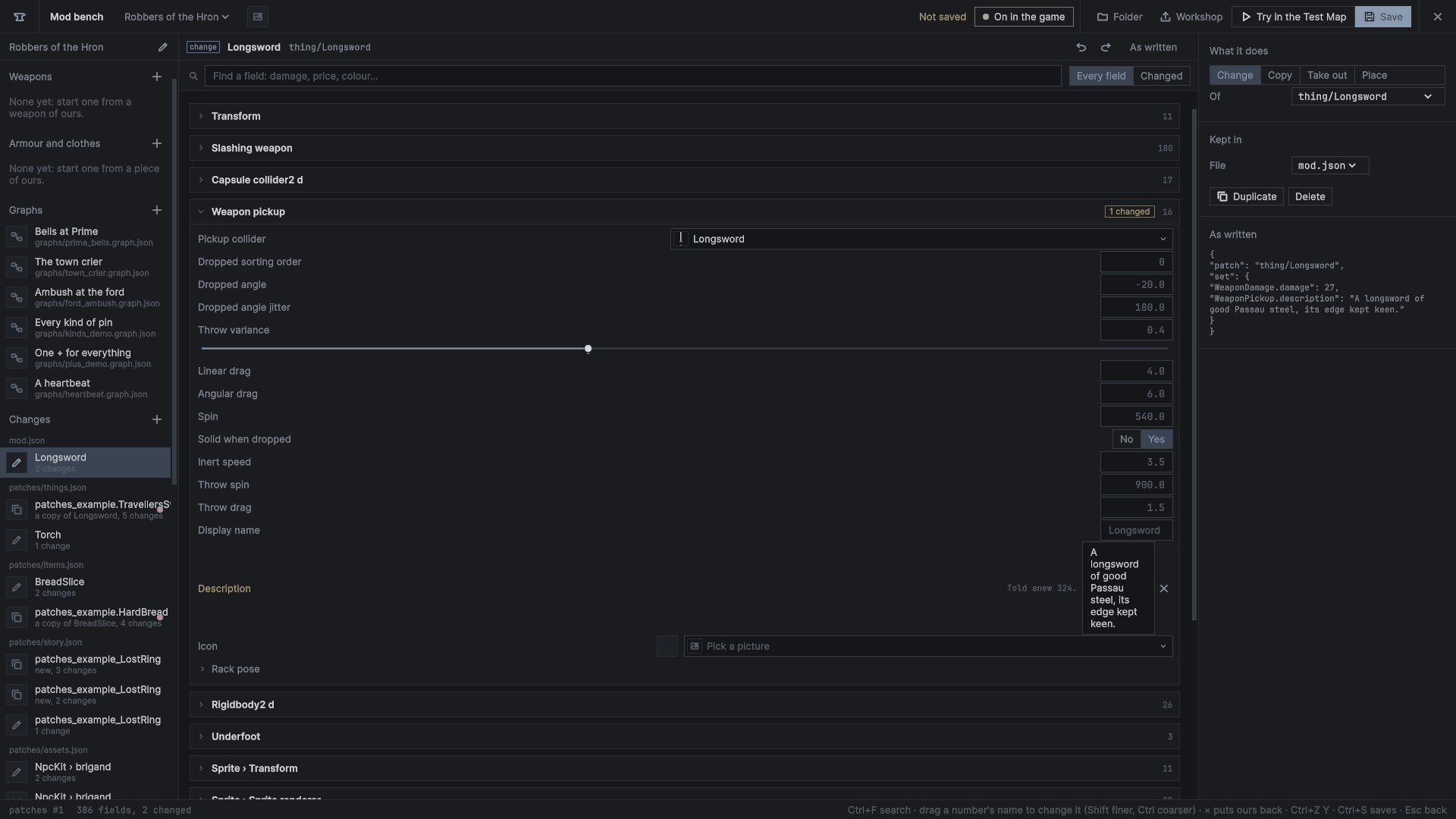
- The page is an inspector of what you picked, read live: every component of a thing and its children, an item's or an asset's fields, an RP row's keys. Each part folds, with a count of what is changed in it; a search finds a field.
- Change a field as on the weapon page: the game's value is the placeholder, a changed one is gold with the game's beside it and × to go back. Numbers drag along their names, choices are drop-downs, colours open the colour picker, pictures and sounds are picked from the mod's files or ours, links are picked.
- Lists add, take out, set one element and reorder, as rows.
The side shows the problems, what the entry does, its address, the file it is kept in, and the entry as written. Undo and redo cover every file of changes; Save writes the changed files into patches/*.json and lists them in mod.json.