
Getting started
Getting started
A mod is a folder. It holds a file called mod.json and whatever that file names: PNG pictures, WAV, OGG or MP3 sounds, and more JSON. There is no programming language. Everything a mod does is written as plain data, and most of it can be made without writing anything at all, on the game's own Mod bench.
A mod can:
- add weapons, armour and whole bodies of its own, or change ours (Weapons, Armour and clothes, Bodies)
- change any saved value of anything in the game by its address, make new things as copies of ours, and place things in scenes (Patches)
- add behaviour as node graphs: when something happens, do this (Graphs)
- build arena maps and additions to ours out of the game's own roads, rivers, walls and buildings (The map editor)
- change how people think and choose (AI brains)
- stand in for any of the game's files with its own (Files over ours)
- translate the game, reword it, add a language, give people new things to say (Words and barks)
- build on other mods (Mods that need other mods)
Where the game finds mods
The game looks for mod folders in three places:
- a
Modsfolder beside the game (<game folder>/Mods; in the Unity editor, the project folder'sMods) - a
Modsfolder in the player's data folder,%USERPROFILE%/AppData/LocalLow/<company>/<product>/Mods - the player's Workshop subscriptions: Steam keeps each in a folder of its own. One still downloading comes in at the next start.
A folder whose name starts with _ is skipped. Starting the game with -nomods loads none.
Switching a mod on
Only the mods switched on are loaded. The main menu's Mods page lists every mod found, with a switch on each, what it holds and any problems with it. A new mod starts switched off. The list of what is on is kept in mods-on.json in the player's data folder; the Mods page writes it, so there is no need to touch it.
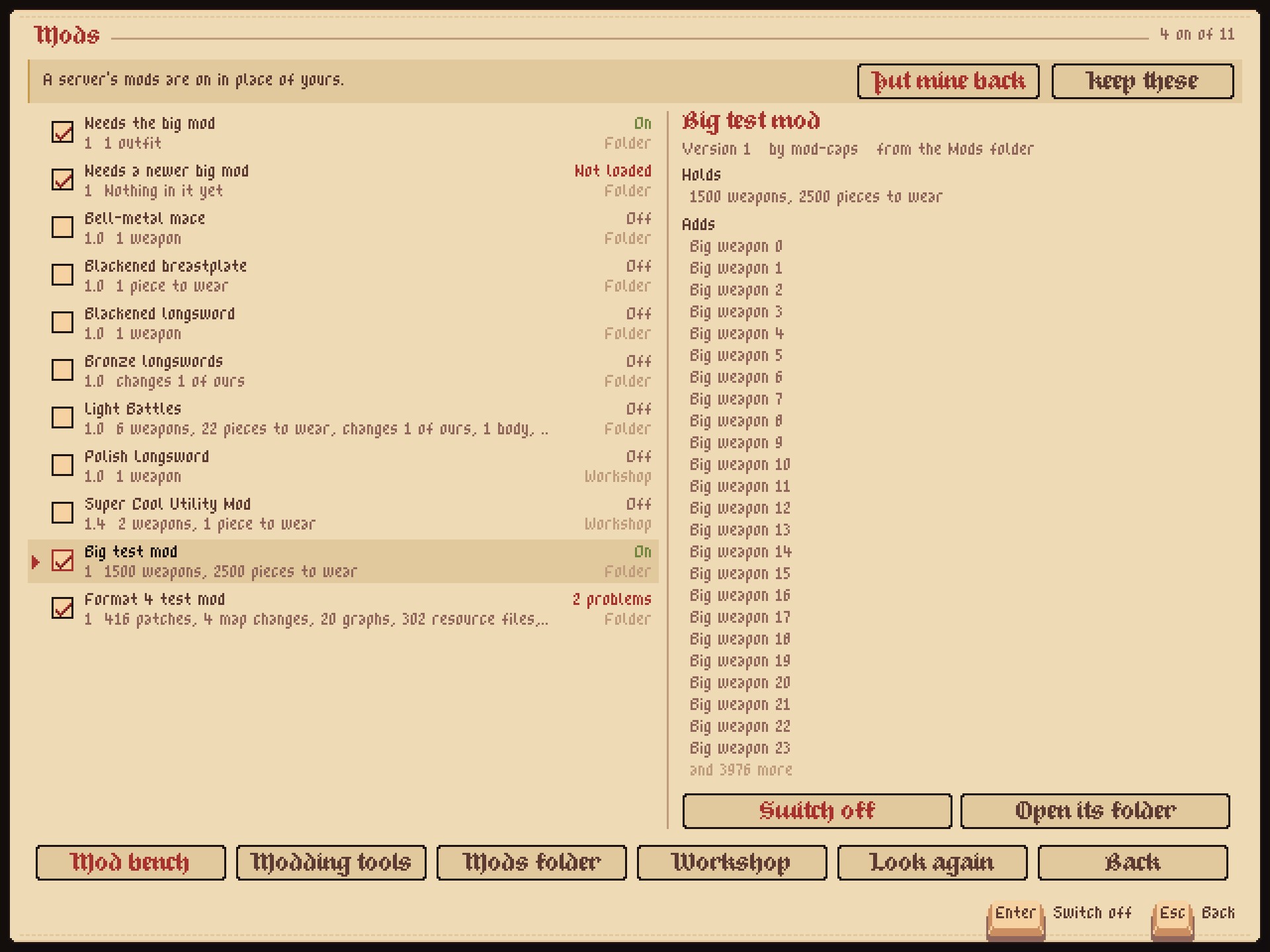
Each mod loaded is written in the game's log with what it made and its problems after it:
[Mods] Blackened steel 1.0 (example, 1f2e3d4c): 1 weapons, 1 piecesA mod that can't be loaded as it is says why on the Mods page, naming the file and the entry: patches/items.json #2: "itemNam": ItemData BreadSlice has no "itemNam" - did you mean "itemName"?. A mistake in one part never stops the rest of the game.
A first mod, step by step
The quickest way in is a template: a small finished mod to change. This makes a new longsword of your own.
- In the main menu, open Mods, then Mod bench.
- Press From a template and pick Blackened longsword.
- Give it a name ("My first sword") and your name, then Make it. The bench makes a new mod in your Mods folder, with a new id made from its name, and switches it on.
- Pick the sword in the list on the left: it opens on the pixel canvas. Draw over it: the pencil is B, the eraser E, the colour picker I, and the wheel zooms.
- Change a number on the right: its damage, how long it takes to swing. The meters at the top of the right panel show where it stands among our weapons.
- Press Try in the Test Map. The bench saves the mod and starts the Test Map with the sword in your hand.
- Back at the main menu, the bench opens again where you left it.
Other templates start a new piece of armour, change one of ours in place, or give a weapon its own sounds. The mod bench tells every page of it.
The pieces of a mod
my_mod/
  mod.json              what the mod is and what it has
  black_blade.png       a picture it names
  patches/more.json     changes, kept in files of their own
  graphs/bells.graph.json
  resources/Camp/Ring.png   a file standing in for one of ours
  texts/cs.json         words in another language
mod.json and formats tells every key of mod.json. Everything else hangs off it.
What you need
Nothing but the game. The bench makes and changes every part of a mod. Any text editor and painting program work too: the bench takes in a file changed on disk by itself. The ModKit beside the game holds every one of our weapons and pieces as a picture to start from, the example mods, and the reference of every graph node.