
Maps and minds
The map editor
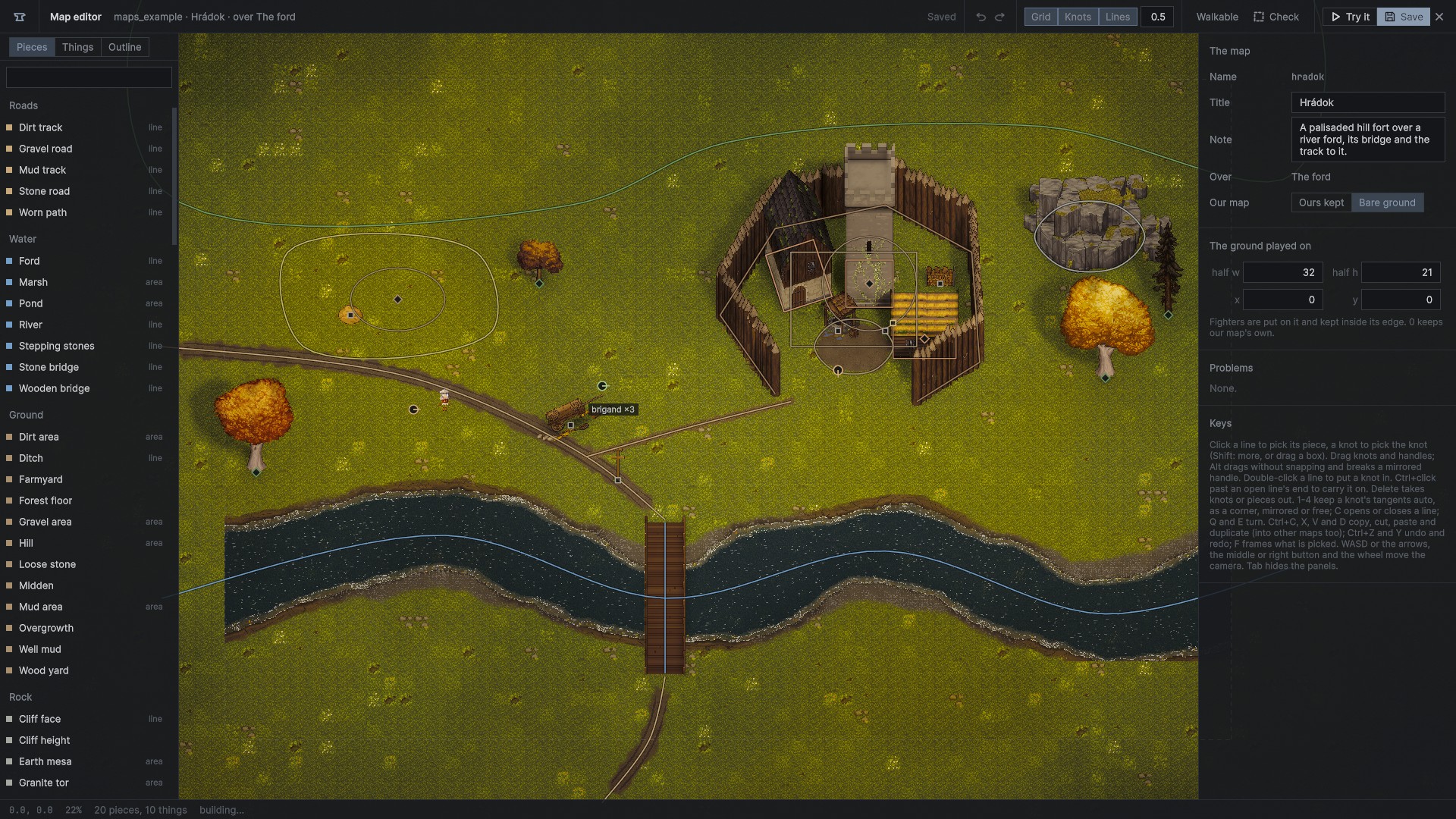
A mod can make arena maps of its own, and additions to our maps, from the game's own pieces: roads, rivers and fords, rock, woods and fields, palisades and castle walls, every building of the kit. Each piece is the game's own, built by its own generator, so a road made here is a road like ours. They are laid in the world itself, in the Mod bench's map editor. Format 4.
"maps": [ { "name": "hradok", "title": "Hrádok", "scene": "ford", "file": "maps/hradok.map.json" } ]Making one
- On the bench, the mod's list has a Maps group. Press +.
- Give it a name and a title, pick which of our arena maps it is built over (the ring, the ford, the farmstead, the quarry, the castle yard, or Šášov for the siege), and whether our map's own world stays or only its ground (bare; the siege keeps its castle).
- It opens in the world, in the map editor. Back at the main menu, the bench is too.
The editor
The world view is the game's camera held above the ground: WASD or the arrows move it, the middle or right button drags, the wheel zooms toward the pointer. The ground played on is drawn dashed. The left panel has three pages:
- Pieces: 147 kinds in 13 groups:
- roads: dirt, gravel, mud and stone, and worn paths
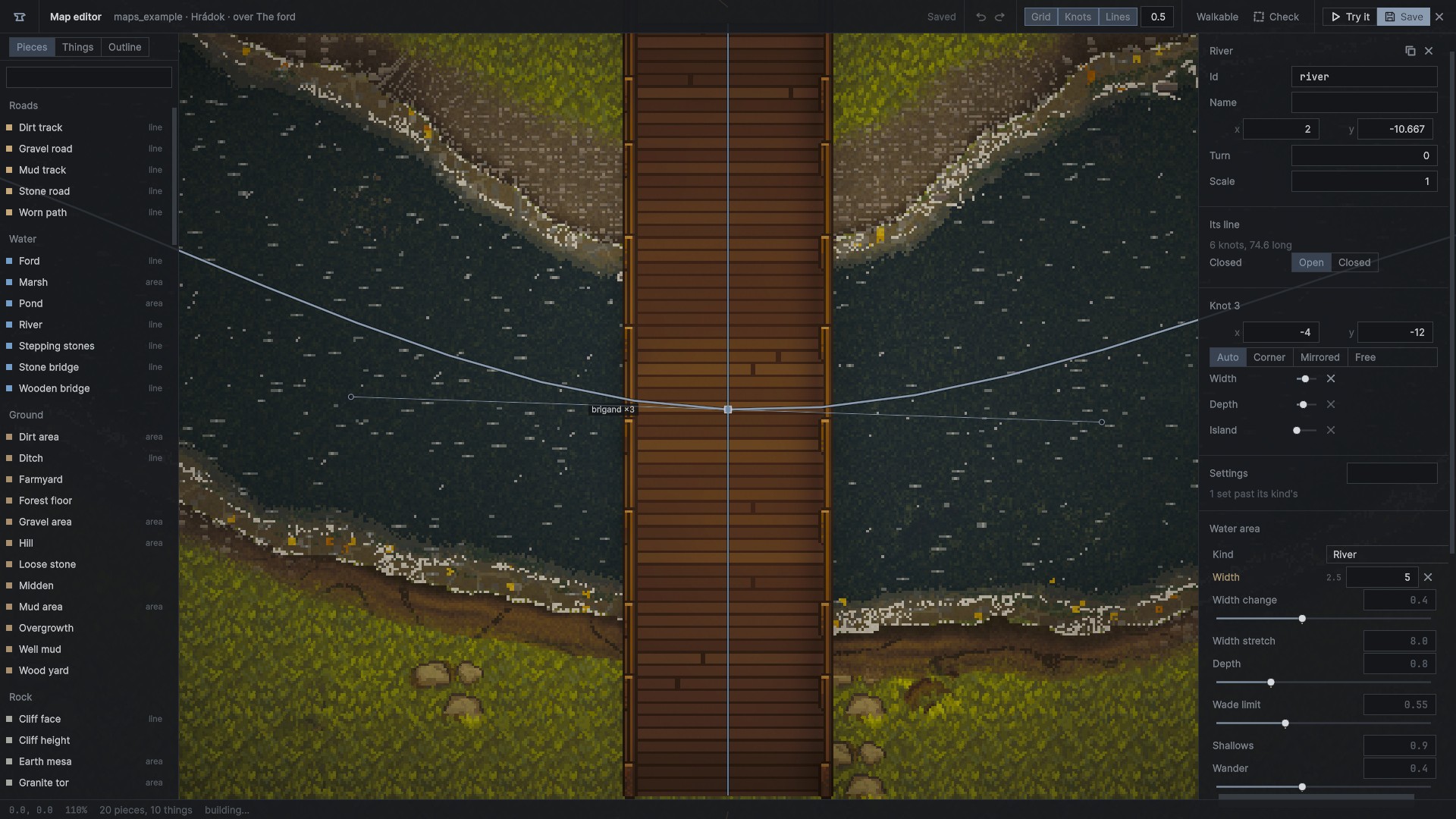
- water: rivers (their width, depth and islands set at each knot), ponds and marshes, fords and stepping stones, wooden and stone bridges
- ground: dirt, gravel and mud areas, ditches, hills, farmyards, forest floor, loose stone, middens, well mud, wood yards, overgrowth
- rock: cliff faces, outcrops, tors, ledges, crags, caves
- woods, fields, grass and bushes, single trees
- castle walls with gates, sheds and stairs, and castle areas
- fences: palisades, post and rail, posts, palisade walkways with their gates, loopholes, ladders and stairs
- every building of the kit: brick, stone and timber houses, towers, a keep, farmsteads, mills, a chapel, a tavern
- private ground and map areas
- wildlife: crows, larks, sparrows, flies
- Things: the generators' props, people (with their kit, side and skill), beasts (horses, boar, pigs, sheep, goats, cattle, fowl), and the catalog's things and items.
- Outline: every piece and thing by group. The eye leaves one out of the map without deleting it.
The right panel shows the map (title, note, bare, the ground's size, its problems), or the picked piece with every setting of its parts, as a patch would set them, or the picked thing.
Drawing and editing
| draw | pick a kind, click on the map knot by knot; the first knot again closes an area; a double-click, Enter or the right button ends a line. A kind with no line is put down with a click (Shift: more) |
| pick | click a line for its piece, a knot for the knot; Shift adds; drag on the ground boxes knots and things; Ctrl+A |
| move | drag knots (all picked move), a piece by its line, a thing; Alt drags without snapping |
| snap | to knots near, then to other pieces' lines, then to the grid (its step in the head, G) |
| tangents | a picked knot shows its handles; 1 keeps it auto (smooth, as the game draws), 2 a corner, 3 mirrored, 4 free; Alt breaks the mirror |
| knots | double-click a line to put a knot in; Ctrl+click past an open line's end carries it on; Delete takes knots out |
| lines | C opens or closes a line; a river's numbers at each knot have sliders |
| turn | Q and E turn things |
| edit | Delete, Ctrl+C, X, V, D (copied across maps), Ctrl+Z, Y, Ctrl+S; F frames; Tab hides the panels |
Every change is one step of undo. The world is built again only where a change touched it: a moved line is rebuilt near the change, and heavy pieces (rock, woods, walls, buildings) follow a drag a few times a second, all at once when it ends.
Checking and trying
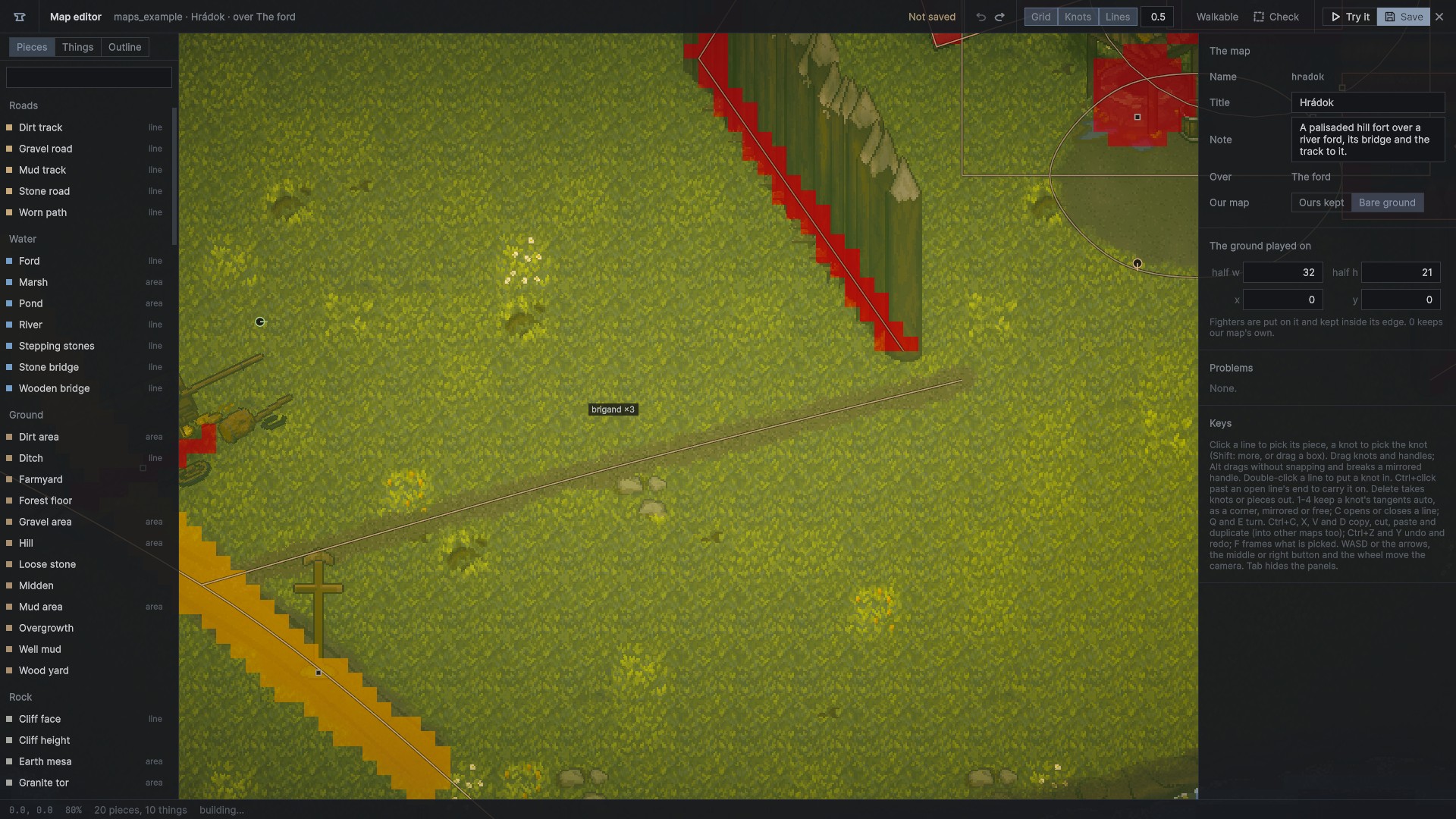
- Walkable lays the game's navigation grid over the world.
- Check walks the ground from the middle and tells how much of it can be walked to, marks what is cut off, and names the people and things standing where nobody can get.
- Try it (F5) puts you where the camera looks, makes the people, beasts and items, and plays the map on foot. F5 or Esc goes back to editing.
Playing it
- A map is listed after ours on the Host page and in the map vote at a match's end. A dedicated server takes it as
-map <mod id>.<name>. A mod's siege may name it in its"map". - Its pieces and props are built on every machine, the same from the same file. People, beasts, items and things are made only where the game is decided, and reach players as anything spawned does.
- Its places and patches are done only while that map is played, never on plain ours.
- The file is part of the mod's stamp, so only players with the same map meet.
The map file
maps/<name>.map.json, plain JSON:
{
  "map": 1, "name": "hradok", "title": "Hrádok", "note": "...", "scene": "ford", "bare": true,
  "halfW": 32.0, "halfH": 21.0, "x": 0.0, "y": 0.0,
  "pieces": [
    { "id": "river", "kind": "water/river", "label": "", "x": 2.0, "y": -10.67, "turn": 0.0, "scale": 1.0, "off": false,
      "lines": [ { "closed": false,
                   "knots": [ { "x": -38.0, "y": -1.33, "inX": 0.0, "inY": 0.0, "outX": 0.0, "outY": 0.0, "mode": "" } ],
                   "data": [ { "key": "Width", "at": [ 2.0 ], "values": [ 1.3 ] } ] } ],
      "set": [ { "path": "WaterArea.width", "value": "5" } ] }
  ],
  "things": [ { "id": "brigands", "thing": "person/brigand", "x": -20.0, "y": 0.0, "turn": 0.0, "count": 3, "off": false, "set": [] } ]
}scene: which of our arena maps it is built over;baretakes our map's own world away (never on Šášov).halfW,halfH,x,y: the ground played on (0: the base's own); the arena's edge and spawns follow it.- A piece: its
kind, its place,turnandscale,offto keep it in the file but out of the map, itslinesofknots(each with its tangents andmode: auto,linefor a corner,mirror,free), numbers along a line indata, and its settings insetas patch paths and values. - A thing:
prop/<kit name>,thing/<catalog>,item/<id>,beast/<kind>orperson/<kind>, with its place, turn, count and settings (a person'skit,side,tier,faction). - The file is checked whole as it loads: kinds by name (with "did you mean"), ids, the knots a kind needs, numbers in range. A mistake names its piece:
maps/x.map.json piece "river" line 1: .... - Patches name a piece
map/<scene>/<mod id>.<id>.
Building into our scenes
"patches": [ { "build": "maps/x.map.json", "scene": "MainGame" } ]A build entry builds a map file into one of our own scenes each time it loads.
Example
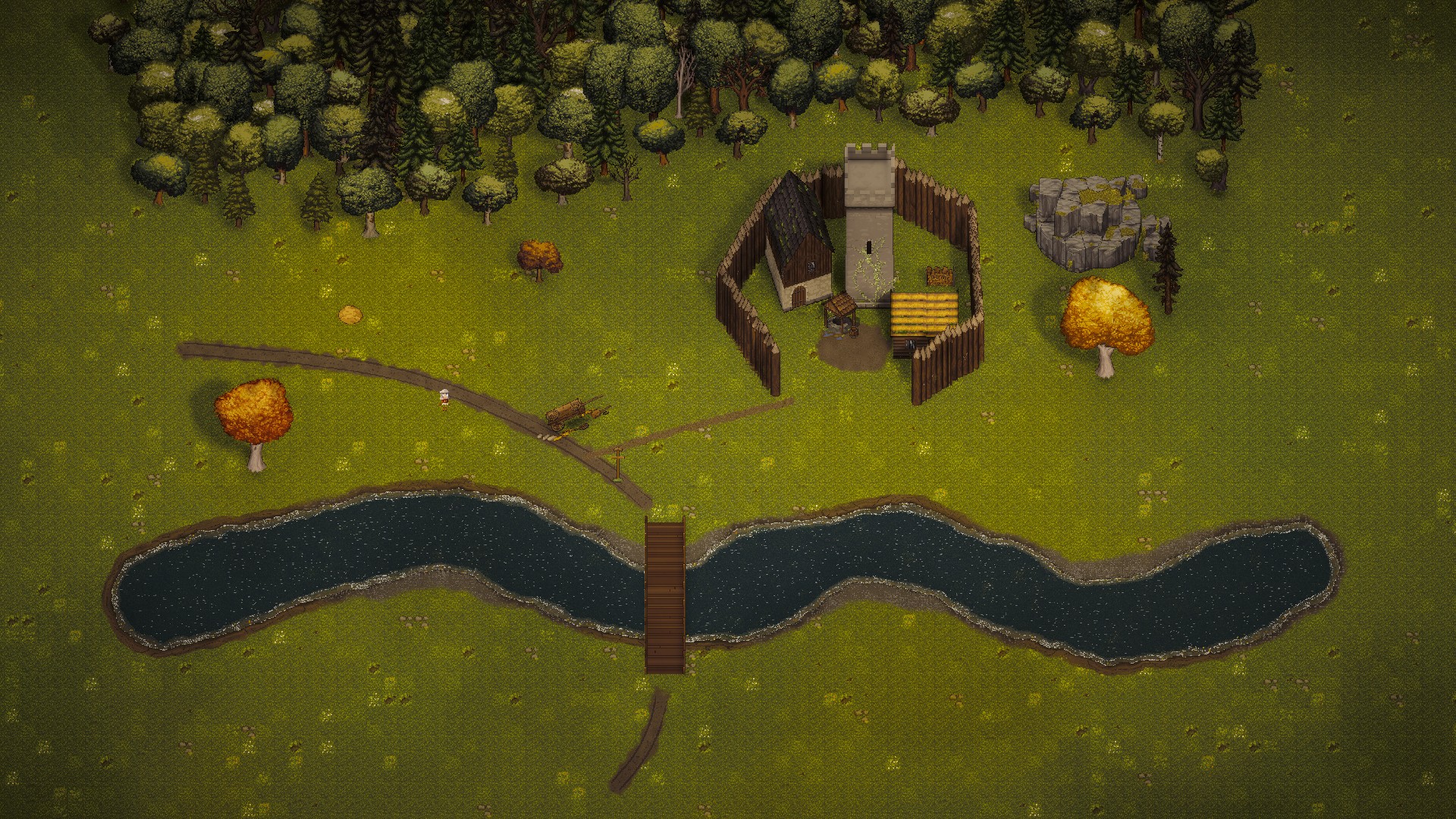
Examples/maps holds Hrádok, an arena map over the ford (a river with a timber bridge, tracks, a mixed wood, a rock outcrop, a palisade and a stone tower with ivy), and outworks before Šášov for the siege (a ditch, stake lines and a camp).
Villages aren't offered in the map editor yet: their generator runs only in the Unity editor.